LinkedIn Patches

Partition the grid into clue-sized rectangles and squares.

2–7 minutesBy LinkedInReleased 2026-03-18
linkedin.com/games/patches
LinkedIn Patches official start screen
Official LinkedIn Games start screen, captured August 2026.

What is Patches?

Platform
Web
Access
Official LinkedIn link
Schedule
Daily at midnight PT
Session
2–7 minutes

Patches is a daily spatial-logic puzzle from LinkedIn. Partition the whole grid into rectangles and squares whose areas match the numbered clues, with no overlaps and no gaps.

LinkedIn Patches is a spatial logic puzzle about dividing a grid into non-overlapping shapes. Every cell must belong to exactly one patch, and every patch must contain exactly one clue cell. A clue may specify a size, a shape orientation, both, or neither. LinkedIn’s current rules allow square, tall rectangle, wide rectangle, and freeform shape information, so the puzzle expands beyond a simple rectangle-division exercise.

Patches was introduced in March 2026 as LinkedIn’s seventh game, inspired partly by Shikaku-style area puzzles and positioned as a sibling to Zip. The best Patches strategy is to list what each clue could geometrically occupy, then use shared cells and board boundaries to eliminate impossible shapes. This guide explains the official concepts, progressive techniques, and common errors without reproducing today’s Patches solution.

Core rules

  1. 1Draw rectangles or squares around numbered clue cells.
  2. 2Make each shape contain exactly as many cells as its clue says.
  3. 3Cover the whole board with no overlaps and no gaps.

Patches strategy guide

Partition every cell into clue-defined shapes by combining area, geometry, and boundary deductions in LinkedIn Patches.

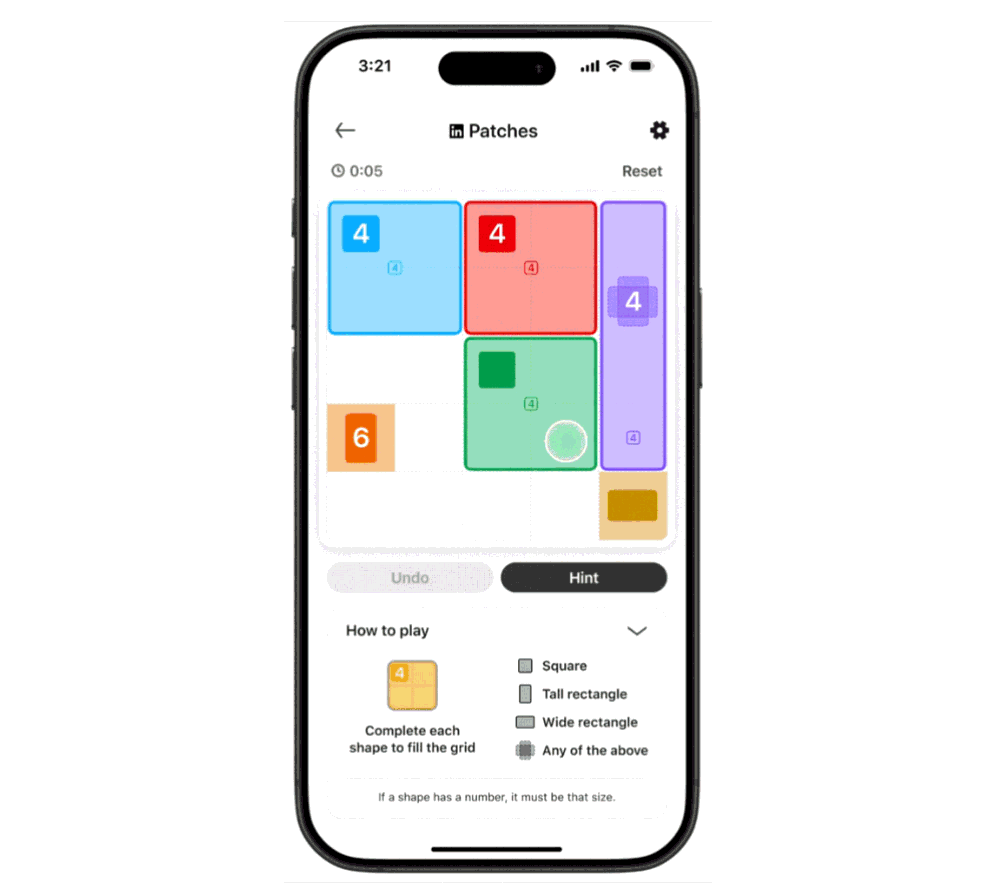
The official tutorial image shows the real game interface and an example puzzle, without revealing today's solution.

LinkedIn Patches official tutorial showing the real game board
Official LinkedIn gameplay tutorial
1

Translate every clue into candidates

A numbered clue tells you how many cells its patch contains. Factor the number to identify possible rectangles: a 6 might be 1×6 or 2×3 when the shape permits. A square clue restricts equal width and height; tall and wide icons constrain orientation. If a clue gives neither size nor shape, use neighbouring clues and remaining space to infer both later rather than inventing an early boundary.

Draw candidate shapes mentally or by tracing lightly from the clue cell. Edges and corners remove many candidates because a shape cannot extend beyond the board. Clues near each other also compete for cells. The goal of the opening scan is not to finish every patch but to find a clue with only one legal footprint or a cell that can belong to only one clue.
2

Reason from cells as well as clues

Every ordinary cell must be claimed exactly once. Pick an awkward cell in a corner, narrow gap, or between established shapes and ask which clue could possibly reach it. If only one clue has a legal shape containing that cell, the patch must extend there even if its other boundaries remain uncertain. This reverse viewpoint is often stronger than testing shapes outward from the numbers.

Watch for cells that no remaining candidate covers. That signals an earlier patch is too small, oriented incorrectly, or blocking access. Because shapes cannot overlap, every confirmed cell removes it from all other candidates. Alternate between clue-centred and cell-centred reasoning to create a chain of forced boundaries instead of drawing complete speculative rectangles.

3

Use area totals to resolve regions

When several clues are enclosed by confirmed boundaries or board edges, add their known sizes and compare the total with the number of available cells. If the areas match exactly, no outside patch can enter that zone and no inside patch can leave it. This can lock a group even when the individual shapes are not yet determined.

Area reasoning is also useful after a large patch is placed. Count the shape of the remaining space, not only its size. A five-cell remainder may have enough area for a clue but the wrong geometry for its permitted rectangle. LinkedIn’s freeform clues require extra care: they loosen shape restrictions, yet the one-clue-per-patch and total-coverage rules still constrain every cell.

4

Handle ambiguous clues late

Clues without a complete size-and-shape specification are designed to interact with their neighbours. Keep several candidate outlines and work on more constrained patches first. As borders accumulate, the ambiguous clue inherits a smaller territory. What began as many possible forms often collapses to one shape because every cell must be covered and no other clue may be included.

Avoid assuming that visually neat symmetry is required. A valid board can use uneven patches, and a freeform clue may bend in a way a rectangle cannot. Follow the icon shown on the actual clue and verify that each finished shape includes exactly one clue cell. The absence of a number or icon is information—it tells you which property must be discovered through context.

5

Improve the redraw count

LinkedIn lets you drag across cells to create a patch and tap a completed shape to delete it. Hint can identify a region or next step; Undo and Reset support recovery. The shared result may show solve time, redraw count, and no-mistake or no-hint labels. Plan candidate geometry before dragging if you want fewer redraws.

Difficulty is designed to rise through the week, so a method that feels excessive on an easy board becomes valuable later. Begin with edges, record forced cells, confirm area, and only then draw. New puzzles are released at midnight Pacific Time and previous boards expire. Measuring clean deductions across several days is more informative than comparing one unusually open grid with a tightly constrained one.

Common mistakes to avoid

These are rule misunderstandings and decision habits that create most avoidable errors.

Assuming every patch is a rectangle

The clue icon controls shape. Current Patches boards may include square, tall, wide, or freeform requirements.

Focusing only on numbers

Shape icons, clue position, neighbouring clues, edges, and uncovered cells all constrain the final partition.

Allowing two clues in one patch

Every patch must contain exactly one clue cell, even if its size and geometry otherwise appear legal.

Drawing the first possible outline

Possible is not forced. Keep candidates until another clue or uncovered cell proves one boundary.

Patches FAQ

Quick answers about rules, access, reset time, and score sharing.

What is LinkedIn Patches?

Patches is a daily spatial logic game where the entire grid is divided into shapes. Every shape contains one clue, shapes do not overlap, and every cell is used.

What can a Patches clue show?

LinkedIn documents clues with a size number, a shape icon, both properties, or neither. Icons can indicate square, tall rectangle, wide rectangle, or freeform.

Are gaps allowed between Patches shapes?

No. The finished partition covers the complete board. Every cell belongs to exactly one patch, with no overlap and no uncovered gap.

What does the Patches result share?

A shared score may include completion time, how many times shapes were redrawn, and labels for no mistakes or no hints.

When did LinkedIn launch Patches?

LinkedIn announced Patches on March 18, 2026. It became the seventh title in the daily LinkedIn Games lineup.

Ready to play Patches?

Rules are checked against LinkedIn Help, and this guide never publishes today's clues, grid, path, or answer.

Spoiler-free by design